TrailEffectTMP Component
Overview
This component adds a visual trail effect to the TextMeshPro - Text (UI) text component it is applied to.
WebGL Demo
Properties
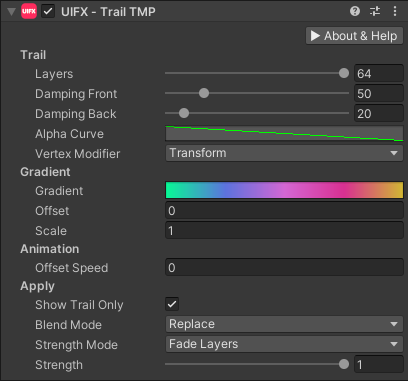
| Property | Type | Details |
|---|---|---|
| Trail | ||
| Layers | Int | The number of layers the trail has. More layers is more expensive. Default value is 16, range is [0..64]. |
| Damping Front | Float | The rate at which the front of the trail catches up with the movement. Higher value results in a less laggy trail. Default value is 50, range is [0..250]. |
| Damping Back | Float | The rate at which the back of the trail catches up with the movement. Higher value results in a less laggy trail. Default value is 50, range is [0..250]. |
| Alpha Curve | Curve | Optional curve to control transparency. Transparency can also be controlled by the gradient property, but having this secondary control is useful when the gradient is animated but you still want to apply a static transparency falloff. |
| Vertex Modifier | Enum | Which vertex modifiers are used to calculate the trail motion. Options are: • Transforms - Only use transform modifications (translation, rotation, scale), this is the simplest. (DEFAULT)• Vertices - Only use vertex modifications.• TransformsAndVertices - Use both of the above, this is the most expensive. |
| Gradient | ||
| Gradient | Gradient | The gradient colors used by the trail |
| Offset | Float | The offset applied to the gradient. The gradient will wrap using mirrored repeating. |
| Scale | Float | The scaling applied to the gradient. The gradient will wrap using mirrored repeating. |
| Animation | ||
| Offset Speed | Float | The animation speed for the offset property of the gradient. Allows easy simple scrolling animation without scripting. Set to zero for no animation. |
| Apply | ||
| Show Trail Only | Bool | Only show the trail, hide the original UI Graphic |
| Blend Mode | Enum | Which color blending mode to use to mix the original vertex colors with the gradient colors. Options are: • Source - Only use the original color, this ignores any trail gradient/alpha settings.• Replace - Ignore the original color and replace with the trail gradient/alpha settings.• Replace_Multiply - Same as Replace for RGB, but multiply the original alpha with the trail gradient alpha.• Multiply - Multiply the original color with the trail gradient/alpha settings. (DEFAULT)• Add_Multiply - Add the original color RGB to the gradient gradient, but multiply the alpha value. |
| Trail Strength Mode | Enum | The mode to use for fading out the trail when strength < 1.0. Options are: • Damping - Reduce damping so that when strength == 0.0 there is no lag in the trail.• Layers - Remove each layer, starting from the back so that when strength == 0 there are no layers visible.• FadeLayers - Same as Layers but with fading instead of a hard cut. (DEFAULT)• Fade - Fade the entire trail down at the same time. |
| Strength | Float | Strength of the effect. Default value is 1.0, range is [0..1] |
Usage
Add this component to any GameObject that contains a UI TMP_Text component. The text will now render with a trail that follows it as it moves.